
I. Ink discharge
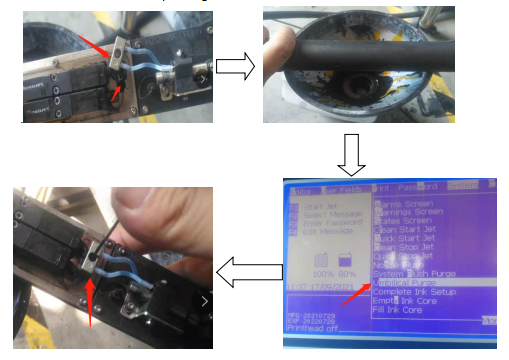
Remove the screw of the ink supply pipe of the printing module of the nozzle, and then put it on the waste liquid tank, and then clean the nozzle throat in the system until all the ink in the ink core is discharged. After the ink discharge is completed, install the screw of the printing module
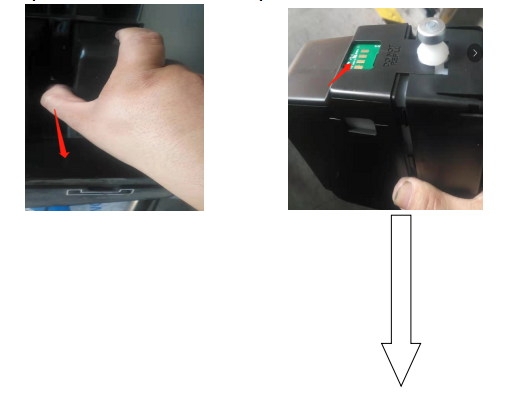
Pull out the ink box, replace the solvent box with the ink chip, install it in the ink slot, and then fill the ink core until the liquid level of the ink core is displayed. About one and a half bottles of solvent are required, and then select the nozzle throat in the system to clean and let the machine cycle for about 20 minutes.
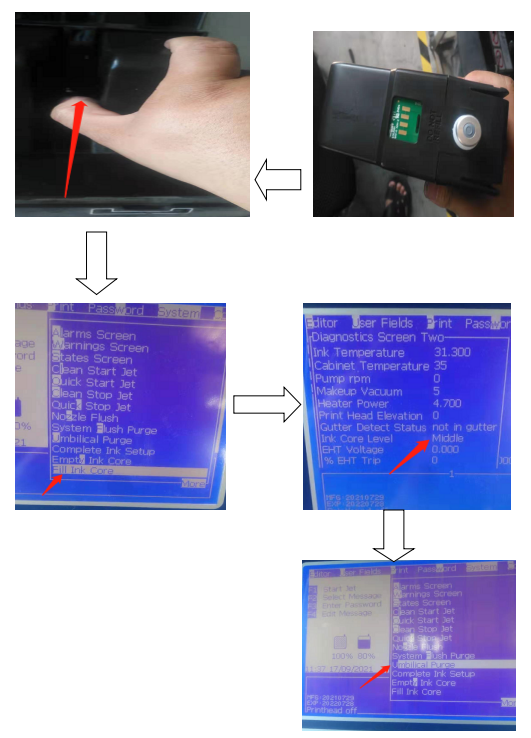
Refer to step 1
IV. Clean again
Refer to step 2
V. Waste liquid discharge
Refer to step 1
VI. Clean again
Refer to step 2
Note: until the discharged liquid is transparent white, it indicates that the machine cleaning is completed, and then insert new ink into the machine to fill the ink core, which requires a bottle and a half of ink.

