
Architectural Profile of the CF-TTO Intelligent Paging Printer
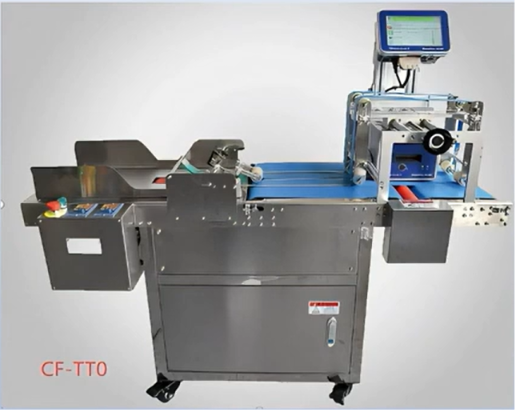
Applying structural variable data—such as high-density ingredient tables, multi-language instructions, or dynamic traceability QR codes—directly onto flat, unformed packaging components requires specialized material handling. When running flexible pouch lines, cardboard sleeve operations, or paperboard tagging lines, standard contact coding systems often suffer from poor tracking or distorted prints due to erratic manual feeding.
The CF-TTO Intelligent Paging Printer solves this by combining an industrial automated friction paging (shingling) system with a high-resolution, all-electric Thermal Transfer Overprinting (TTO) head. This integrated system automates product separation and applies crisp, smudge-resistant digital codes directly onto flat substrates in a single pass, eliminating the need for separate label backing paper and reducing ongoing consumables costs.
Mechanical Separation and High-Friction Transport Dynamics
The production capability of the CF-TTO relies on its automated friction paging assembly, which converts a stacked hopper of flat substrates into a regulated stream of individual items.
[ Bulk Vertical Hopper ]
│
▼ (Micrometric Adjustment Dial)
[ Reverse Retarding Gate ] ───> Applies shear force to block upper sheets
│
▼
[ Friction Paging Wheels ] ───> Pulls the bottom sheet forward cleanly
│
▼
[ Synchronized Feed Belts ] ──> Maintains a uniform gap between items
│
▼
[ TTO Zone ]
Precision Friction Separation
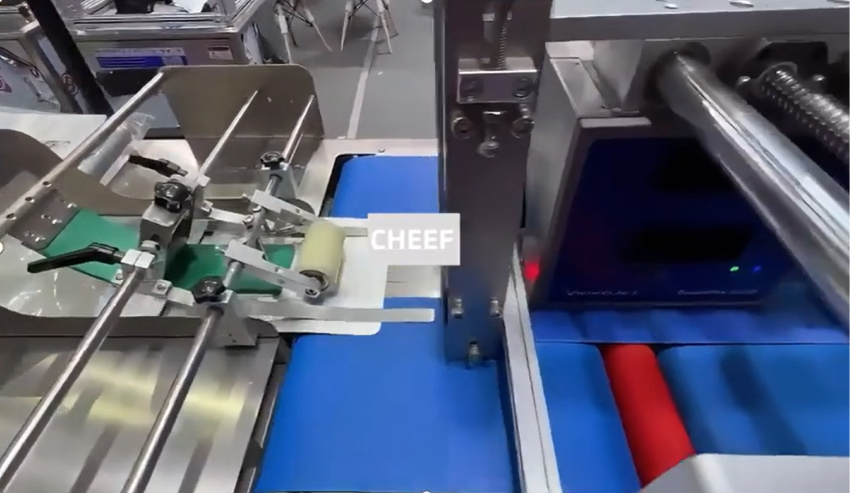
Stacked materials are loaded into a vertical input hopper. At the base of the stack, high-durometer rubber friction wheels rotate against the bottom item, pulling it forward onto the conveyor line. Directly above these wheels sits an adjustable reverse-retarding gate.
By adjusting this gate to match the exact thickness of a single package, the system creates an intentional shear force. This force stops secondary sheets from feeding forward, effectively preventing double-feeds on thin plastic film pouches or static-heavy paper cardstock.
Synchronized Belt Transport
Once separated, the individual substrate enters the main transport conveyor bed. The conveyor speed is linked directly with the paging wheels to maintain a consistent gap between items. This predictable spacing is crucial for downstream tracking sensors, allowing the machine to print and apply labels accurately at high speeds.
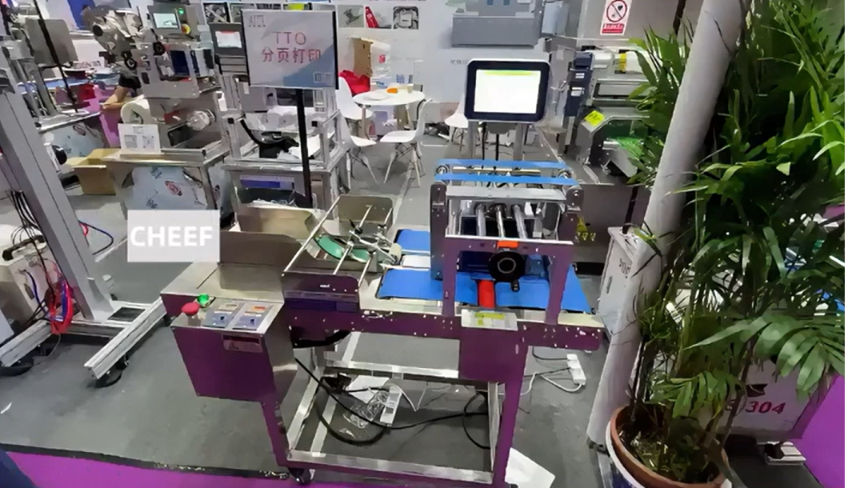
All-Electric TTO Core and Printing Physics
Unlike ink-based continuous inkjet (CIJ) printers that spray fluid drops across an air gap, the CF-TTO utilizes direct contact digital technology to transfer pigment from a ribbon roll onto the substrate.
Thermal Transfer Mechanics
The TTO module features a high-density, linear array of microscopic heating elements operating at 300 dpi (dots per inch) resolution. During a print cycle, the machine’s thermal print head presses a multi-layered ribbon directly against the flat substrate.
When an element is digitally energized, it reaches a precise thermal threshold that melts the wax-resin or pure resin ink layer on the ribbon. Under mechanical pressure, this molten ink separates from its base film and adheres to the target packaging material, curing almost instantly upon contact.
All-Electric Execution Advantage
Older TTO designs use pneumatic cylinders to press the print head down, which can lead to variations in pressure if plant air lines experience fluctuations. The CF-TTO features an all-electric drive motor that controls print head movement and downward force using precise electrical signals. This design ensures consistent print pressure, eliminates the risk of oil or moisture contamination from plant air lines, and maintains a tight 0.5 mm printing gap to minimize ribbon waste.
Hardware Profiles and Technical Specifications
The CF-TTO platform is built with heavy-duty, industrial-grade components designed to handle multi-shift continuous production schedules:
- Electrical Infrastructure: Designed to run on standard 220V AC single-phase lines (50/60 Hz), providing seamless integration into standard industrial power grids.
- Line Velocity and Throughput: Supports variable conveyor tracking speeds up to 45 meters per minute. Depending on item length and data complexity, the system can process between 60 and 220 items per minute.
- Interchangeable Print Windows: To accommodate different amounts of data, the TTO engine can be specified with three modular print head sizes: 32mm x 75mm, 53mm x 75mm, and a wide-format 107mm x 75mm footprint.
- Digital Resolution Matrix: Delivers a sharp 300 dpi print resolution across all configurations, making it ideal for high-density barcodes and small font compliance text.
- Consumables Compatibility: Processes high-capacity industrial ribbon rolls (up to 1,200 meters in length), directly reducing operator intervention and roll changeover downtime.
Primary Industrial Applications
Direct-to-substrate digital printing is highly effective across several primary automated manufacturing and packaging sectors:
- Food Production Packaging: Prints multi-line ingredient lists, nutritional panels, allergen warnings, and traceability QR codes directly onto flat cardboard coffee boxes, snack pouches, and unformed frozen food sleeves.
- Pharmaceutical and Medical Devices: Used to mark dynamic batch numbers, tracking barcodes, and exact expiration dates directly onto flat medical pouches, Tyvek sheets, and unformed blister card backing panels, helping plants comply with global serialization laws.
- Cosmetics and Daily Chemical Goods: Speeds up operations by pre-printing tracking codes and descriptive variables directly onto flat soap boxes, face mask pouches, or flat sample card packets before they go to the product filling lines.
Maintenance, Troubleshooting, and Field Calibration
To keep the CF-TTO operating at peak efficiency over a long lifespan, maintenance teams should follow a structured preventive maintenance routine.
Operational Component Care
- Print Head Maintenance: Ribbon backing debris and microdust can build up along the edge of the digital TTO head. To protect print quality and prevent premature element failures, technicians should wipe the thermal printhead with a lint-free swab saturated with 99% electronic-grade isopropyl alcohol at every ribbon changeover.
- Paging Wheel Cleaning: Over time, paper dust, static coatings, and surface oil can accumulate on the rubber friction paging wheels. Maintenance teams should clean these rollers weekly using a mild, non-solvent rubber cleaner or isopropyl alcohol to prevent material slippage and double-feeding.
Field Tuning Protocols
- Eliminating Double-Feeds: If multiple pouches pass through the feeder at once, the reverse-retarding gate is set too high. Use the machine’s micrometric dial to lower the gate until only a single pouch can pass through the clearance path.
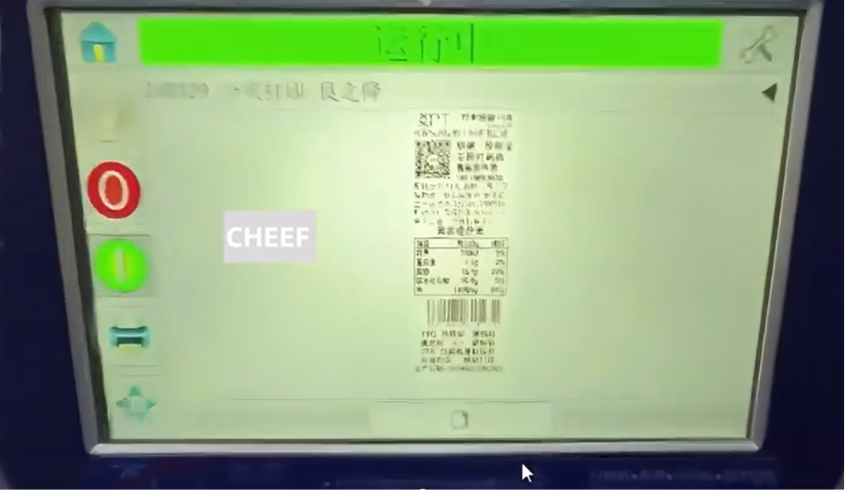
- Correcting Faded Prints: If the printed text appears light or incomplete, check the energy settings on the touchscreen interface. Wax-resin blend ribbons require lower heating energy than pure resin ribbons. Adjusting the digital energy parameters ensures the ink transfers fully and cleanly onto your specific substrate material.
System Advantages
- Direct-to-Substrate Coding: Prints directly onto the packaging film or box flat, eliminating the need for adhesive label backing paper and lowering total cost of ownership (TCO).
- High-Volume Automated Paging: Converts stacks of flat pouches, bags, or sleeves into a single-file stream, eliminating manual loading bottlenecks.
- All-Electric Driving System: Eliminates pneumatic components, ensuring stable print head pressure, minimizing mechanical wear, and keeping the printing gap within 0.5 mm to reduce ribbon waste.
- High-Resolution Data Rendering: A 300 dpi thermal print engine produces crisp barcodes, clean logos, and sharp text that remain smudge-free throughout downstream filling and distribution.
Frequently Asked Questions (FAQ)
Q1: Why is direct TTO printing on a flat pouch better than using an inkjet printer?
Inkjet printers spray liquid ink across a physical gap, which can lead to clogged nozzles when paper dust builds up, and the ink can smudge if it doesn’t dry instantly on glossy plastic films. The CF-TTO uses solid ribbon rolls and localized heat elements, completely eliminating the risk of clogged nozzles. This system produces crisp, smudge-resistant barcodes that remain scuff-free and readable even when packages slide down downstream metal rollers or loading chutes.
Q2: How does the system’s ribbon saving mode help reduce ongoing consumables costs?
When printing small blocks of data (like a simple two-line expiration date) on large packages, a lot of ribbon can go unused between print cycles. The system’s integrated ribbon saving mode slows down or stops ribbon advancement during the non-printing gaps within a cycle. This step minimizes unused space on the ribbon, maximizes the output of each roll, and directly reduces your ongoing consumables cost per package.
Q3: Can the CF-TTO handle thick corrugated cardboard box flats?
Yes. The friction-feeding hopper and reverse-retarding gate are fully adjustable. By adjusting the micrometric adjustment dials, engineers can widen the opening to accommodate thick, rigid cardboard sheets or unformed corrugated box flats up to several millimeters thick, ensuring they feed one at a time onto the conveyor bed.
Q4: What happens if the thermal transfer ribbon snaps or runs out during production?
The CF-TTO includes an integrated electronic ribbon break detection loop within the TTO engine. If the ribbon snaps or runs out, the tension arm trips an internal microswitch. This instantly pauses the conveyor bed and friction paging wheels, and triggers a visual alert light on the HMI tower. This automated safety stops unprinted products from passing through the machine, preventing labeling errors and material waste.
Watch the Full Video Tutorial:
This article summarizes the key points from our original video. Watching the full tutorial provides a clearer understanding of the procedures, demonstrations, and practical maintenance tips.
▶ Watch the full video below.
📺 Subscribe to the Cheef YouTube Channel to receive future maintenance guides, troubleshooting tutorials, product demonstrations, and industry updates.
