
Guide to Multi-Channel Mobile Printing Systems for Large-Area Packaging
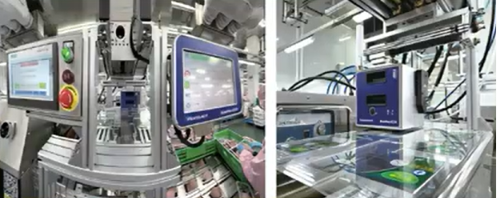
In modern industrial packaging, production lines running multi-row or multi-channel configurations—such as thermoforming blister lines, multi-lane sachet packers, and vacuum stretch-film packaging machines—present a unique coding challenge. Printing variable, high-density data across multiple channels simultaneously typically requires either installing a dedicated printer for every single lane or utilizing large traveling inkjet systems.
Multi-channel mobile printing technology provides a more efficient and economical solution. By mounting a single high-resolution Thermal Transfer Overprinter (TTO) onto an automated, motorized traversing axis, this system prints complex, large-area data across multiple lanes during brief production pauses. For plant engineers, maintenance teams, and industrial distributors, this guide explains the mechanics, technical benefits, and practical applications of mobile traversing TTO technology.
Operating Principles of Mobile Traversing TTO Systems
Multi-channel mobile printing systems are designed to integrate with automated packaging machinery where the main web or forming mold pauses periodically during the production cycle (intermittent indexing).
Instead of keeping the printer fixed and moving the packaging film underneath it, the substrate film comes to a complete stop during its filling, sealing, or forming phase. At that exact moment, the host packaging machine sends a synchronization signal to the mobile printer’s master controller.
The system’s internal drive activates a high-precision motorized actuator, moving the single TTO print head horizontally across the stationary film along a linear guide rail. As it passes over each individual packaging channel or lane, the thermal print head drops down, executes the precise localized print, and lifts before moving to the next lane. Once the entire multi-lane row is printed, the printer prepares for a reverse pass or resets, and the packaging machine advances the film for the next cycle.
Technical Comparison: Mobile TTO vs. Multi-Coder Setups vs. Inkjet
When designing or upgrading a multi-lane packaging line, engineers generally choose between three configurations. Evaluating their technical differences reveals why a mobile traversing TTO system is often the most sensible approach:
Capital Expenditure and Hardware Footprint
Installing an individual fixed TTO coder for every single lane creates an incredibly crowded and expensive setup. On a 4-lane or 6-lane line, buying multiple printers significantly drives up hardware procurement costs. It also leaves very little space for routine maintenance and introduces multiple control interfaces for operators to manage. A mobile printing system solves this by using just a single TTO print head mounted on a motorized linear axis, cutting hardware costs and saving valuable space on the machine frame.
Coding Resolution and Cleanliness
Some plants attempt to use moving continuous inkjet (CIJ) printers for large-area content across multiple rows. However, inkjet technology often suffers from limited font resolution and can leave print direction lines or jagged edges on complex graphics.
A traversing TTO system delivers crisp, high-density prints at up to 300 dpi. Because it uses solid thermal transfer ribbons instead of liquid ink, it completely eliminates the risk of ink splashes, solvent odors, or fluid contamination. This makes it an ideal choice for clean-room environments and sensitive products like medical devices, infant formulas, and cosmetics.
System Hardware Profiles and Specifications
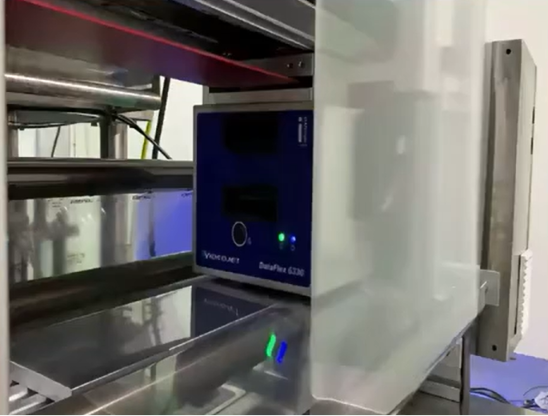
The engineering layout of multi-channel mobile systems depends on the number of lanes, total web width, and required traversing speed. The equipment family includes specialized models like the CFX and XML series, which are built to handle heavy-duty automated production:
- Lane and Channel Capacities: Standard configurations are built to handle 2, 3, 4, 5, or 6 lanes. Specialized configurations can be customized to cover wider, high-density line layouts.
- Traversing Track Widths: Linear structural axes are available in standard travel spans of 600 mm and 800 mm to match standard thermoformer and strip packer web widths.
- Power and Control Systems: The system operates on universal power supplies ranging from 90V to 264V AC at 700 Watts. It features an integrated Human-Machine Interface (HMI) with a button-based industrial control panel for inputting channel counts, travel lengths, and speed parameters.
- Operational Limits: Designed to run reliably in industrial plant environments with a working temperature range of 2 to 40 degrees Celsius.
Industrial Applications and Machinery Integration
Mobile traversing printing systems are primarily used on automated packaging lines where products are processed in multi-row configurations:
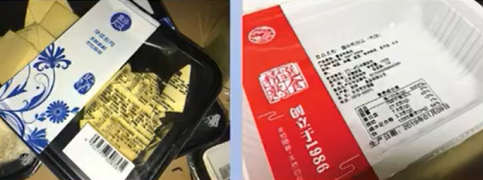
- Thermoforming and Stretch-Film Packaging: Often used for vacuum-sealed proteins, cheese blocks, or medical blisters. The single TTO head moves across the wide thermoformed film to print large nutrition tables, ingredient lists, and expiration dates before the individual pockets are cut apart.
- Multi-Lane Strip and Sachet Packing: Used in pharmaceutical and cosmetic plants to pack powders, granules, or liquids. The system applies barcodes, lot numbers, and tracking data across up to six lanes simultaneously during the brief sealing pause.
- Top-and-Bottom Cover Sealing Systems: Ideal for tray-sealing operations that pack medical kits or prepared meals in side-by-side rows, ensuring clean data application across every container.
Maintenance, Troubleshooting, and Parameter Calibration
Because a mobile printing system combines digital thermal printing with precise mechanical movement, keeping it running reliably requires a routine maintenance schedule:
Technical Parameter Calibration
- Position and Accuracy Alignment: Operators adjust the lane spacing variables through the controller interface. If the prints are off-center relative to the packaging pocket, the position parameters must be recalibrated by adjusting the channel indexing numbers (e.g., setting the target variance precisely within a 0.5 mm window) to realign the print cycles with the physical layout of the lanes.
- Speed Synchronization: The linear traversing speed must be properly matched with the dwell time of the packaging machine. If the travel speed is set too low, the packaging machine might advance before the print head finishes its pass, causing torn film or a machine collision.
Preventive Maintenance and Troubleshooting
- Linear Guide Rail Care: Wipe down the horizontal guide rails and checking the drive belts weekly. Accumulated dust, plastic shavings, or debris along the track can cause the servo motor to drag, leading to mismatched lane alignment or motor overcurrent faults.
- Print Head Maintenance: Because the print head travels dynamically across the line, ensure the data cables and ribbon supply tubes move freely without catching on the frame. Clean the print elements regularly with isopropyl alcohol to prevent dust buildup from reducing print quality.
Operational Summary
- Single-Unit Multi-Lane Management: Uses one TTO print head on a motorized track to handle multi-row packaging layouts, eliminating the cost and space requirements of installing multiple printers.
- High-Resolution Content: Delivers crisp, 300 dpi digital prints, allowing lines to apply complex graphics, nutrition tables, and compliance barcodes cleanly without the direction lines or fluid mess of traveling inkjet systems.
- Flexible Lane Configurations: Features an integrated control panel that lets operators adjust settings for 2 to 6+ lanes, with standard linear tracks available in 600 mm and 800 mm travel widths.
- Pneumatic-Free Clean Operation: Eliminates the use of liquid inks and compressed air, ensuring a clean, solvent-free coding environment that complies with strict hygiene standards for cosmetics, food, and medical packaging.
Frequently Asked Questions (FAQ)
Q1: What happens if our packaging machine changes from a 4-lane setup to a 2-lane setup? Do we need to buy a new printer?
No. The system is designed for quick reconfigurations. You only need to change the channel count parameter on the controller interface and update the position coordinates for the new lanes. The physical traversing printer stays on its existing guide rail, saving you from purchasing new hardware when product sizes change.
Q2: Why is a mobile TTO system preferred over a moving continuous inkjet (CIJ) system for large-area text?
Traveling inkjet systems print pixel by pixel through a moving deflector, which often leaves faint print lines, restricts font resolution, and can distort text at higher travel speeds. TTO uses a high-density, 300 dpi thermal print head to press ink directly from a ribbon onto the film. This contact printing method ensures crisp, dark characters, solid logos, and highly readable QR codes that inkjet systems struggle to match over wide areas.
Q3: How do we synchronize the movement of the traversing printer with our main packaging machine?
The system connects directly to the master PLC of your host packaging machine. When the film indexes forward and pauses to seal or form, the packaging PLC sends a clean “print trigger” signal to the traversing controller. The printer completes its horizontal run across the lanes and returns a “print complete” signal to the packaging machine, allowing the film to safely advance for the next cycle.
Q4: Can this system print while the packaging film is moving forward?
No. This specific mobile traversing system is built for intermittent packaging processes where the film pauses periodically. The film must remain completely stationary while the print head travels horizontally across the lanes to apply the codes. For lines where the film never stops, a different configuration using multiple fixed printers or a continuous tracking assembly is required.
Watch the Full Video Tutorial:
This article summarizes the key points from our original video. Watching the full tutorial provides a clearer understanding of the procedures, demonstrations, and practical maintenance tips.
▶ Watch the full video below.
📺 Subscribe to the Cheef YouTube Channel to receive future maintenance guides, troubleshooting tutorials, product demonstrations, and industry updates.
