
Hydraulic Recovery Diagnostics: Overcoming Gutter Return and Recycling Faults on Videojet 1000 Series Printers
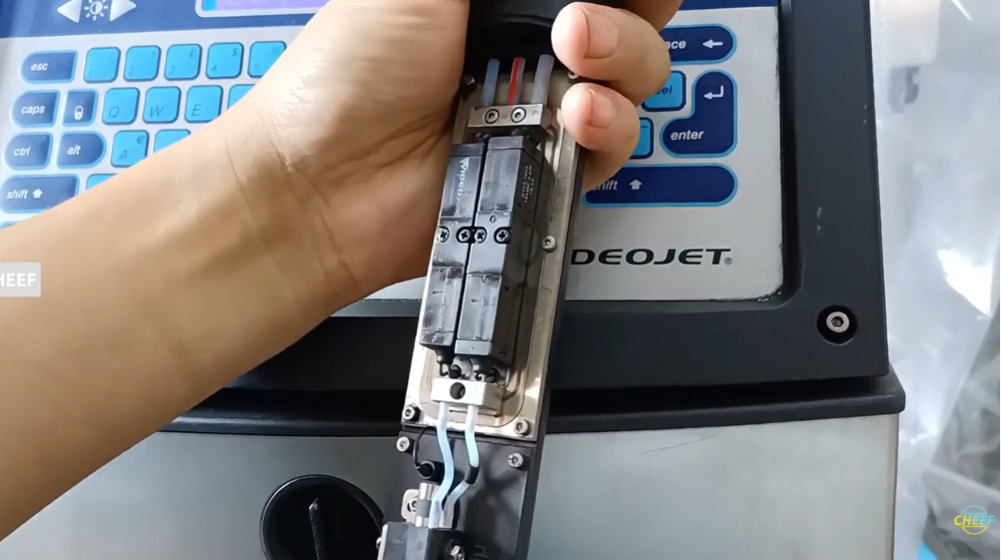
In Continuous Inkjet (CIJ) technology, fluid circulation relies on a closed-loop system. When a Videojet 1000 Series printer (such as the 1210, 1510, or 1610) fires its jet, any ink drops not chosen for text characters travel into the recovery gutter. This recycling tank returns the uncharged fluid straight back to the main ink core block. If this vacuum pathway fails or becomes blocked, ink accumulates in the printhead housing, causing immediate pooling, mess, and high-voltage short-circuit faults.
For field service technicians, packaging line operators, and distribution engineers, maintaining strong gutter vacuum performance is crucial for preventing long line stoppages.
Technical Mechanics behind Recycling Failures
The recovery loop relies on a balance between the positive pressure driving the ink stream out of the nozzle and the negative vacuum suction pulling it back through the gutter line. Gutter return errors generally trace back to three distinct technical issues:
- Physical Stream Deflection: The suction loop is physically clear, but a partial blockage at the nozzle orifice causes the ink stream to shoot crooked, missing the mouth of the gutter entirely.
- Gutter Mouth Crusting: Solvent evaporates rapidly inside the open printhead assembly during operation, leaving behind a hard layer of dried ink scale that plugs the narrow recovery intake hole.
- Vacuum Line Obstruction: Microscopic fibers or thick ink sludge get drawn into the umbilical line, building up a clog inside the narrow vacuum tubes that prevents the suction pump from pulling fluid back to the core.
Systematic Field Diagnosis Walkthrough
If the printer alerts you to a recycling or gutter vacuum fault, follow these sequential steps to safely isolate the root cause.
Phase 1: Visual Inspection of the Stream Path
Never jump straight into a mechanical teardown. Power on the printer’s ink stream and look closely at the printhead deck using a flashlight. Check whether the ink line is shooting straight into the absolute center of the gutter opening.
If the stream misses the target completely, stop the jet immediately. Use the printhead’s manual alignment screw to adjust the trajectory back onto the center axis before checking anything else.
Phase 2: Clearing Surface Material
If the stream hits the target but fluid is still pooling on the printhead floor, the intake hole itself is likely blocked. Stop the jet and spray fresh matching wash solvent directly down the throat of the gutter mouth. Let the solvent sit for a minute to dissolve any hardened ink scale.
Use a clean, lint-free cloth to wipe the surrounding surface. Do not use standard paper towels, as their fibers will get sucked into the gutter line and create a worse blockage down the pipe.
Phase 3: Applying Manual Syringe Suction
If the suction path remains blocked after washing the intake hole, you need to clear the internal line:
- Turn off the printer power safely.
- Locate the gutter purge line connector or access port on the side of the fluid module.
- Fill a standard maintenance syringe with a small amount of clean wash solvent and lock it onto the purge line port.
- Gently push the solvent into the line to break up any hardened clogs, then reverse the plunger to draw the loosened sludge out into the syringe.
- Disconnect the syringe, restart the printer, and run the automated line prime loop to verify that normal system vacuum has returned.
Troubleshooting Recovery System Faults
| Active System Symptom | Probable Technical Root Cause | Field Action Plan |
| Ink Overflows out of Printhead | Total loss of vacuum suction or a completely blocked gutter return line. | Stop the jet instantly. Clean the pooled ink from the deck, and use a service syringe to backflush the return tube with fresh solvent. |
| Intermittent Gutter Fault Alarms | Microscopic air leak at the ink core manifold connection reducing vacuum draw. | Check the seating of the main ink core block, verify that all interface screws are tight, and ensure the gaskets are not pinched. |
| Ink Misting inside Head Shroud | The ink stream is clipping the edge of the gutter mouth instead of entering cleanly. | Clean the nozzle plate face to remove any micro-deposits, then use the calibration screw to re-center the stream. |
Preventive Fleet Management Protocols
- Run the Automated Daily Flush: Always allow the printer to complete its full automated cleaning cycle when shutting down at the end of a shift. This cycle replaces the raw ink inside the return lines with clear solvent, keeping fluid from drying into a solid plug while the machine sits idle.
- Inspect Umbilical Lines for Kinks: High-speed robotic arms or moving traversing mechanisms can bend the printer’s umbilical cord over time. Ensure the umbilical line maintains a gentle curve; sharp bends can pinch the internal vacuum tubes, reducing suction power and triggering false gutter faults.
Frequently Asked Questions
Why does a gutter fault happen only during the first ten minutes of a morning shift?
This morning fault typically points to a small amount of ink that dried inside the line overnight. When you start the machine up cold, the pump struggles against this semi-solid restriction. Pre-flushing the gutter mouth with fresh solvent before starting the jet usually prevents this problem entirely.
Can I turn up the internal pump speed to force more vacuum suction through a sluggish gutter?
No. The pump speed is balanced by the printer’s software to maintain specific system pressure and fluid viscosity levels. Artificially forcing a higher pump speed will disrupt drop formation at the nozzle and can cause foaming inside the mixing tank. Focus on clearing the physical blockage instead.
How can I tell if a suction problem is caused by a clogged gutter or a worn-out core pump?
Disconnect the gutter return line from the fluid manifold and test the port opening with your finger while the pump is running. If you feel strong suction right at the port face, the pump is working fine, meaning the clog is located further up inside the printhead or umbilical line. If suction feels weak at the port, the internal vacuum pump or its seals are likely worn and due for replacement.
Watch the Full Video Tutorial:
This article summarizes the key points from our original video. Watching the full tutorial provides a clearer understanding of the procedures, demonstrations, and practical maintenance tips.
▶ Watch the full video below.
📺 Subscribe to the Cheef YouTube Channel to receive future maintenance guides, troubleshooting tutorials, product demonstrations, and industry updates.
